
Gradients#
Gradients#
This user-guide notebook showcases how to compute the gradient of a data variable.
import holoviews as hv
import numpy as np

import uxarray as ux

hv.extension("bokeh")
Data#
This notebook uses a subset of a 30km MPAS stmopshere grid, taken centered at 45 degrees longitiude and 0 degrees latitude with a radius of 2 degrees.
face_lon: Longitude at cell-centersface_lat: Latitude at cell-centersgaussian: Gaussian initialized at the center of the gridinverse_gaussian: Inverse of the gaussian above.
base_path = "../../test/meshfiles/mpas/dyamond-30km/"
grid_path = base_path + "gradient_grid_subset.nc"
data_path = base_path + "gradient_data_subset.nc"
uxds = ux.open_dataset(grid_path, data_path)
uxds
<xarray.UxDataset> Size: 3kB
Dimensions:           (n_face: 195)
Dimensions without coordinates: n_face
Data variables:
    face_lat          (n_face) float32 780B ...
    face_lon          (n_face) float32 780B ...
    gaussian          (n_face) float32 780B ...
inverse_gaussian (n_face) float32 780B ...Gradient Computation#
Background#
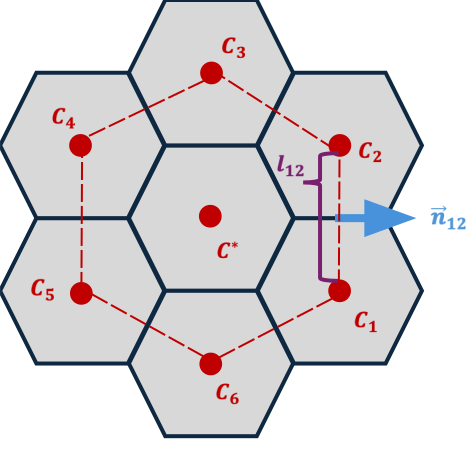
Suppose our scalar field values are stored on the faces of a hexagonal grid and we wish to approximate the gradient at the cell center $C^*$. We leverage the Green–Gauss theorem:
To apply this:
Construct a closed control volume around $C^*$ by connecting the centroids of its neighboring cells.
Approximate the surface integral on each face using a midpoint (or trapezoidal) rule.
Sum the contributions and normalize by the cell volume.
While the schematic below is drawn on a “flat” hexagon, in practice our grid resides on the sphere, so all lengths $l_{ij}$ and normals $\mathbf{n}_{ij}$ are computed on the curved surface.
Implementation#
In a finite-volume context, the gradient of a scalar field $\phi$ is obtained by summing fluxes across each cell face and dividing by the cell’s volume.
Input |
Usage |
Output |
|---|---|---|
Scalar field $\phi$ |
|
Vector field $\nabla\phi$ |
Finite-volume discretization#
Discrete gradient at cell center $C^*$#
Usage#
Gradients can be computed using the UxDataArray.gradient() method on a face-centered data variable.
grad_lat = uxds["face_lat"].gradient()
grad_lon = uxds["face_lon"].gradient()
grad_gauss = uxds["gaussian"].gradient()
grad_inv_gauss = uxds["inverse_gaussian"].gradient()
Examining one of the outputs, we find that the zonal_gradient and meridional_gradient data variables store the rate of change along longitude (east–west) and latitude (north–south), respectively.
Plotting#
To visualuze the gradients, we can represent them as a hv.VectorField and overlay the vectors on top of the original data variable. Below is a utility function that can be used.
def plot_gradient_vectors(uxda_grad, **kwargs):
    """
    Plots gradient vectors using HoloViews
    """
    uxgrid = uxda_grad.uxgrid
    mag = np.hypot(uxda_grad.zonal_gradient, uxda_grad.meridional_gradient)
    angle = np.arctan2(uxda_grad.meridional_gradient, uxda_grad.zonal_gradient)

    return hv.VectorField(
        (uxgrid.face_lon, uxgrid.face_lat, angle, mag), **kwargs
    ).opts(magnitude="Magnitude")
# Overlay the gradient vector field on top of the original data variable
p1 = (
    uxds["face_lat"].plot(cmap="Oranges", aspect=1) * plot_gradient_vectors(grad_lat)
).opts(title="∇ Cell Latitudes")
p2 = (
    uxds["face_lon"].plot(cmap="Oranges", aspect=1) * plot_gradient_vectors(grad_lon)
).opts(title="∇ Cell Longitudes")
p3 = (
    uxds["gaussian"].plot(cmap="Oranges", aspect=1) * plot_gradient_vectors(grad_gauss)
).opts(title="∇ Gaussian")
p4 = (
    uxds["inverse_gaussian"].plot(cmap="Oranges", aspect=1)
    * plot_gradient_vectors(grad_inv_gauss)
).opts(title="∇ Inverse Gaussian")

# Compose all four plots in a 2 column layout
(p1 + p2 + p3 + p4).cols(2).opts(shared_axes=False)